Unity VR Development in Pakistan: Getting Started Guide for Local Developers
Unity is free to download and use for developers earning under $200,000 per year — which covers virtually every Pakistani developer starting out. Combined with the free XR Interaction Toolkit and free Meta XR SDK, you can build professional-quality VR applications for Meta Quest without spending a single rupee on software licenses. The minimum PC you need costs approximately PKR 200,000–300,000 if you do not already have one. Experienced VR developers in Pakistan earn PKR 100,000–500,000 per month through freelancing on Upwork and Fiverr.
Why Unity for VR Development
Unity is the dominant platform for standalone VR development in 2026, particularly for the Meta Quest ecosystem. The Meta Quest app store has more Unity-built games than any other engine. Unity’s XR Interaction Toolkit provides a free, comprehensive framework for VR interactions — grabbing objects, teleportation locomotion, UI interaction with VR controllers — that would take months to build from scratch. The engine has a gentler learning curve than Unreal Engine and better documentation for beginners. Unity’s scripting language is C#, which is widely taught in Pakistani universities and has an enormous online learning community.
The business case for Unity VR in Pakistan is also strong. Meta Quest development requires Android build support, which Unity handles natively. PC VR (SteamVR) development also uses Unity. A single Unity project can be built for both Quest standalone and PC VR with minimal changes, maximising the value of every project. The free Unity tier (Unity Personal) is sufficient for all individual developers and small studios in Pakistan — the paid Unity Pro tier is only required for companies earning over $200,000 per year. For the free assets that accelerate your development, see our guide to best free Unity VR assets in 2026.
PC Requirements for Unity VR Development
Minimum PC for Unity VR Development in Pakistan: GPU: NVIDIA RTX 2060 (minimum), RTX 3060 or better recommended. CPU: Intel Core i7 8th generation or AMD Ryzen 5 3600 or better. RAM: 16GB minimum, 32GB recommended. Storage: 100GB free minimum for Unity, Android Build Support, and project files. OS: Windows 10 64-bit or newer. A setup meeting the minimum specs costs approximately PKR 200,000–300,000 in Pakistan in 2026. Many Pakistani developers already have machines that meet these specs for other development work.
The GPU requirement deserves special attention: VR rendering requires significantly more GPU power than flat-screen development because the game must render at high frame rates for two displays (one per eye) simultaneously. An RTX 2060 is the practical minimum for VR development — it is fast enough to run Quest Link for testing and preview your VR scenes at full frame rate. An RTX 3060 or RTX 3070 is more comfortable and will be more future-proof. In Pakistan, an RTX 3060 costs approximately PKR 75,000–90,000 from local markets like Hafeez Centre (Lahore) or Saddar Electronics (Karachi).
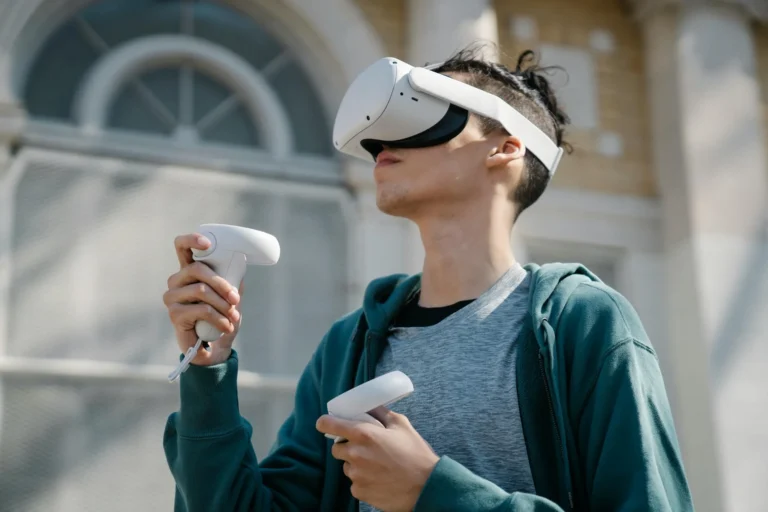
You do not need a VR headset to start learning and building — the Meta Quest simulator in the Meta XR SDK lets you test basic interactions without a physical headset. However, you will need a physical Quest 3 for final testing before submitting to the Meta app store, and to genuinely feel how your application performs in VR. The headset is not required from day one, which means you can start building and learning for free or with only the PC investment.
Getting Started: The Free Tool Stack
Unity Personal (Free)
Unity Personal is the free tier of the Unity game engine and it is everything a Pakistani VR developer needs to start. You get the full Unity editor, the full C# scripting environment, access to all packages including XR Interaction Toolkit, the ability to build for Android (Quest), PC, and all other platforms, and access to the Unity Asset Store with thousands of free and paid assets. The engine download is approximately 2.5GB for the base installation. Android Build Support (needed for Quest builds) adds another 1GB. The XR Interaction Toolkit and Meta XR SDK install via the Package Manager inside Unity, typically downloading 200–500MB each. Unity Personal requires a free Unity account — create one at unity.com with any email address.
Pros
- Fully functional — no feature limitations compared to paid tiers
- Free for individual developers and small studios
- Includes all XR and VR development features
- Massive learning community and documentation
Cons
- Shows Unity splash screen in builds (removable with Unity Pro)
- Requires upgrade if studio earns over $200K/year
Meta XR SDK (Free)
The Meta XR SDK is Meta’s official Unity integration package for Quest development and it is the most important free tool for Pakistani developers targeting the Quest platform. It provides hand tracking (detecting all 26 joints of both hands without controllers), passthrough access (showing the real world through the headset cameras), Scene Understanding (detecting walls, floors, and furniture in the user’s physical environment), spatial anchors, and building block components for common VR interactions. The SDK is available through the Unity Package Manager or Meta’s developer portal. It is essential for any Quest-native application and provides capabilities that the generic XR Interaction Toolkit does not include. For a guide to the XR Interaction Toolkit itself, see our Unity XR Interaction Toolkit guide.
Pros
- Enables hand tracking without controllers
- Passthrough and mixed reality development support
- Scene Understanding for room-aware applications
- Free, officially supported by Meta
Cons
- Quest-specific — not useful for PC VR only projects
- Requires Meta developer account (free)
Visual Studio Code (Free)
Visual Studio Code with the C# extension is the recommended code editor for Unity development on Windows in Pakistan. It is significantly lighter than the full Visual Studio IDE (VS Code installs in under 200MB versus Visual Studio’s 5GB+) while providing all the features a Unity developer needs: IntelliSense code completion for Unity APIs, breakpoint debugging, integrated terminal, and Git integration. The C# extension for VS Code handles Unity’s specific namespace structure correctly and provides go-to-definition, find-all-references, and refactoring tools that dramatically speed up development. Pakistani developers with older laptops that struggle with the full Visual Studio IDE will find VS Code runs considerably faster. Install the Unity extension alongside C# for additional Unity-specific project navigation features.
Pros
- Lightweight — runs well on older hardware
- Free and open source
- Excellent C# IntelliSense for Unity APIs
- Huge extension ecosystem for additional tools
Cons
- Debugger setup slightly more manual than full Visual Studio
Blender (Free)
Blender is the free, open-source 3D modeling, animation, and rendering tool used extensively by Pakistani VR developers and game developers. For VR development, Blender is used to create custom 3D models, environments, props, and character meshes that you import into Unity. The Pakistani developer community has embraced Blender strongly — there are active Blender communities on Facebook and Discord in Pakistan, and Pakistani YouTube creators produce Blender tutorials in Urdu. Learning Blender alongside Unity gives you the complete pipeline: model your own 3D assets in Blender, export to FBX or glTF, import into Unity, and build your VR application. This combination eliminates the need to purchase 3D assets for most projects and is a highly marketable skill set for freelancing clients who want custom VR environments.
Pros
- Completely free — no license fees ever
- Full professional 3D pipeline: modeling, rigging, animation, rendering
- Active Pakistani community and Urdu tutorials available
- Direct FBX and glTF export for Unity
Cons
- Steep initial learning curve — takes weeks to become productive
- GPU-heavy for rendering — needs dedicated graphics card
Pakistani Developer Community
The Pakistani game development community is more active than many developers realise. On Facebook, the Unity Pakistan group has tens of thousands of members with active daily discussions on Unity development issues, job postings, and project showcases. Game Developers Pakistan is another active Facebook group covering broader game development topics including VR. On Discord, several Pakistani game development servers exist where developers share work, collaborate, and help beginners — search for “Pakistani Game Developers” on Discord to find the active ones.
For professional networking, LinkedIn has a growing Pakistani game developer community. Several universities including NUST, FAST, and COMSATS have active game development clubs that organise game jams and workshops — connecting with these communities is valuable for young developers. The freelancing community is also extensive: many experienced Pakistani Unity developers are active on Upwork and accessible for mentorship or collaboration through professional networks.
Earning Money as a VR Developer in Pakistan
Freelancing is the primary income path for Pakistani VR developers in 2026. Upwork and Fiverr are the main platforms. A Unity VR developer with a portfolio of two to three projects can find work at $25–50 per hour on Upwork for straightforward VR environment and interaction development. Experienced developers with strong portfolios and client reviews earn $50–150 per hour. A single 40-hour VR development project at $50/hour generates $2,000 — approximately PKR 550,000 at current rates. Monthly income of PKR 200,000–500,000 is achievable for developers with one to two years of consistent quality work and strong Upwork profiles.
The most in-demand VR development work from international clients includes: corporate VR training simulations (safety training, procedure training), virtual showrooms for real estate and product companies, VR education applications, social VR environments, and VR games published on the Meta Quest store. Publishing your own Quest game is also a viable income path — successful Quest indie games earn passive income through the Meta app store, paid in USD via Payoneer or direct bank transfer for Pakistani developers.
Internet Speed Requirements
Unity VR development has specific internet demands that Pakistani developers need to plan for. The initial Unity Hub and Editor download is approximately 2.5GB. Android Build Support adds 1GB. The Meta XR SDK downloads 400–600MB through the Package Manager. The Unity Asset Store allows you to download free and paid assets, which can range from a few megabytes to several gigabytes for larger environment packs. All of this is manageable with a standard home broadband connection if you schedule large downloads overnight.
For ongoing development, internet is needed for: Unity package updates (occasional, small), documentation and tutorial access (constant), version control via Git/GitHub (very small), and asset store purchases (occasional). Your day-to-day development after initial setup is entirely local and requires no internet connection. The Pakistan internet challenge is primarily in the setup phase, not ongoing development. A 5Mbps ADSL connection can handle everything if you are patient with initial downloads. A 20Mbps+ connection makes the setup phase much faster. For more on freelancing tools specific to VR development, see our guide on metaverse development opportunities for Pakistan.
Common Challenges for Pakistani Developers
Pakistani VR developers face several specific challenges worth knowing in advance. Payment receipt is the first: Pakistani banks have restrictions on PayPal, so Upwork earnings should be withdrawn via Payoneer (widely used by Pakistani freelancers) or Wise. Unity subscriptions can be paid via Payoneer-linked debit cards or JazzCash if you eventually need Unity Pro.
Testing without a headset is a genuine limitation: the Meta Quest simulator is useful but imperfect. Partnering with another Pakistani developer who has a headset for cross-testing is practical. Some Pakistani cities have gaming cafes beginning to offer VR headset time by the hour, which can supplement testing access. Hardware failure is another challenge — if your development PC GPU dies, local repair and GPU availability in Pakistan varies. Keeping software projects on GitHub and backing up project files on Google Drive ensures no work is lost. Finally, the local electricity situation in Pakistan means UPS investment for your development PC is not optional for productivity in areas with frequent load-shedding.
Our Recommendation
Start with the free stack today: download Unity Personal, install the XR Interaction Toolkit via Package Manager, install VS Code, and follow Unity’s free XR development tutorials. Build a portfolio project — even a simple VR room with grabbable objects and teleportation demonstrates the core skills clients need. Once you have a working portfolio project and a GitHub repository, create an Upwork profile and start bidding on small VR jobs. Your first job will likely be at a lower rate — accept this as the price of building reviews. Each completed job builds your profile, and after 5–10 completed projects you will have the ratings to command competitive rates. The Pakistani developer advantage is your cost efficiency relative to developers in the US or Europe — use it to win first clients, then increase rates as your portfolio grows.